
Capture live requests
A Live tab records Fetch/XHR traffic with method, URL,
status, type, source and timing — filterable by method, type and
real/mocked/forwarded origin.
Mokup captures live Fetch/XHR traffic, turns any request into an editable mock rule, or forwards matching calls straight to your local server — path, query, method, headers and body preserved.
Free plan · 3 mock rules · No account needed · Your data never leaves your machine

Built for the way frontend developers actually work: capture real traffic, shape the response you need, keep moving.
A Live tab records Fetch/XHR traffic with method, URL,
status, type, source and timing — filterable by method, type and
real/mocked/forwarded origin.
Turn any captured request into a rule instantly. Edit body, status code, matcher, method and artificial delay, then start editing.
Route matching calls to http://localhost:3000 or any
target and stream the real response back — perfect for testing a
new backend against production UI.
A JSON-aware editor with Ctrl+Z / Ctrl+Shift+Z
undo and redo. Experiment with payload shapes without fear.
Add per-rule latency to reproduce timeouts, loading skeletons and race conditions your users actually hit.
Rules, preferences and captured data stay in your browser. No analytics, no tracking, no Mokup server in the middle.
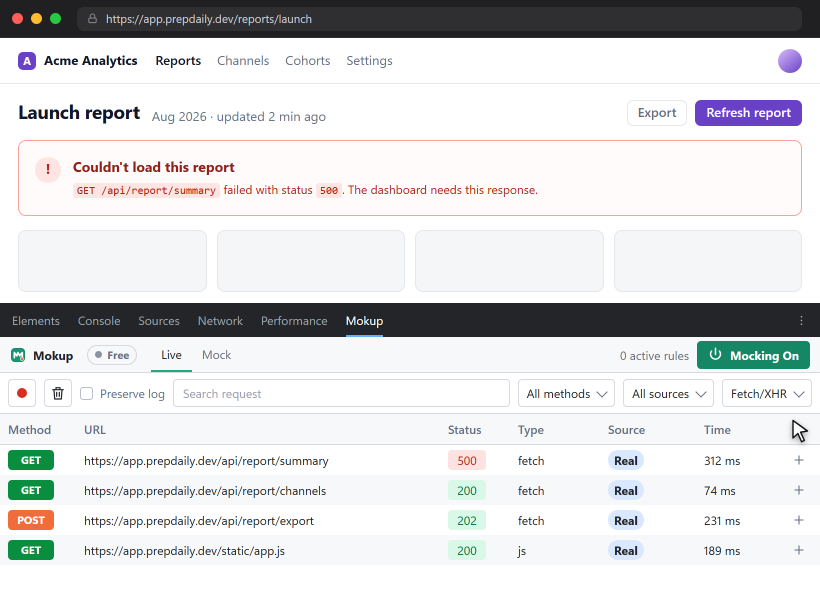
Press F12, open a page, and pick the
Mokup tab. Interception is injected into the
inspected tab only while the panel is open.
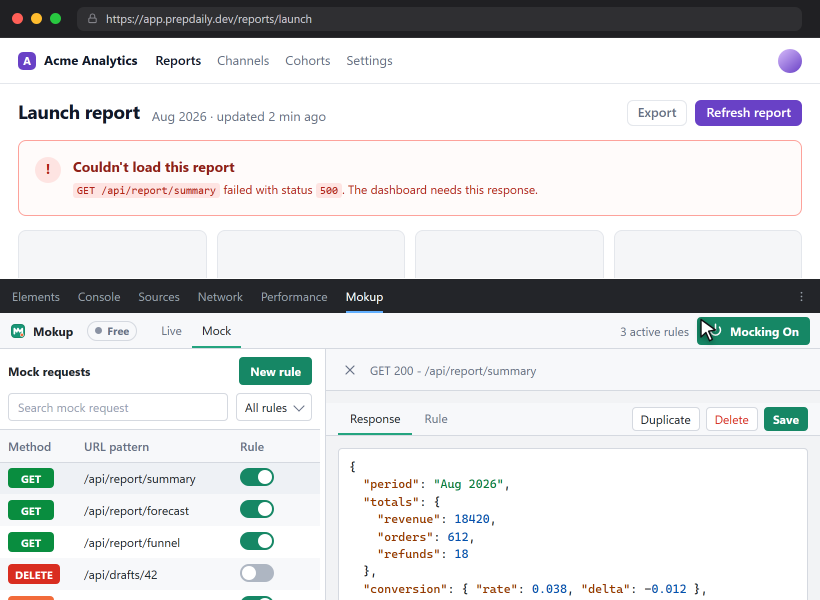
Reload the page, find the request in Live, then hit
create mock. Edit the response body and status to match the
contract you need — no restart, no rebuild.
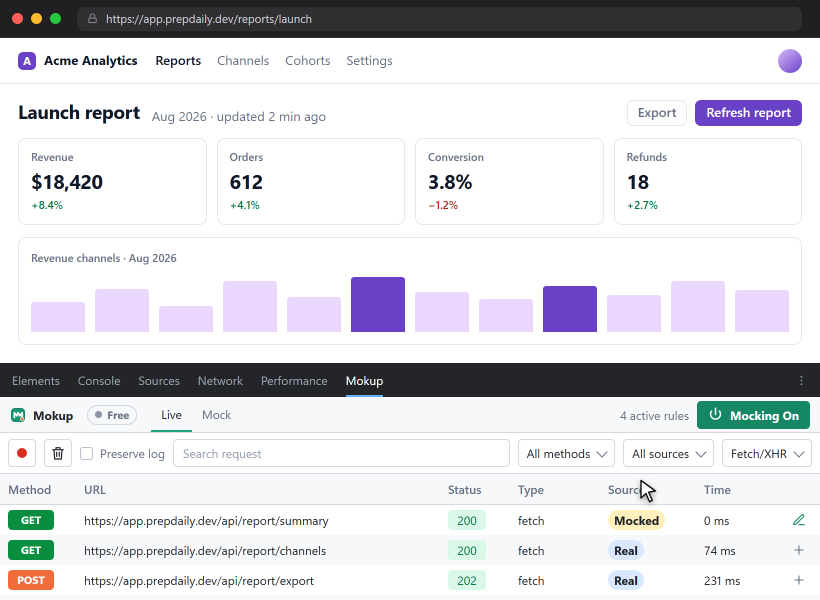
Flip rules on and off, set a delay, and compare Real, Mocked and Forwarded responses side by side.
Stop hardcoding fixtures in your source or waiting for an endpoint to land. Keep experiments in DevTools, where they belong.
Design against realistic payloads instead of placeholders, then swap in the real endpoint when it lands.
Force 500s, empty lists, slow responses and malformed JSON to check every branch of your error handling.
Forward production traffic to your local server with one rule — no config files, no proxy setup, no restarts.
Rules persist across sessions, so testers reproduce the exact same state you saw, without a bespoke build.
No subscription. Pro is a one-time lifetime license validated through Polar.
For side projects and quick experiments.
For developers who live in DevTools every day.
LAUNCH50 for 50% off — first 100
customers
http:// or https:// target you set —
usually a local dev server — and streams the real response back to
the page. Path, query string, method, headers and body are preserved.
Install Mokup, open DevTools, and turn your first captured request into a mock rule in under a minute.
Not on the Chrome Web Store yet? Load the unpacked build from the repository in a few clicks.